---
title: Klaviyo
description: Step by step of implementing the integration with Klaviyo
---
[Skip to content](https://help.segmanta.com/klaviyo#main-content)
English
Show submenu for translations
![300x300 (1).png\]](https://help.segmanta.com/hs-fs/hubfs/300x300%20(1).png?height=40&name=300x300%20(1).png)
- [Default HubSpot Blog](https://segmanta-2.hubspotpagebuilder.com/blog)
Open main navigation
Close main navigation
- [Default HubSpot Blog](https://segmanta-2.hubspotpagebuilder.com/blog)
- English
Show submenu for translations
How can we help?
- There are no suggestions because the search field is empty.
1. [Segmanta Help Center](https://help.segmanta.com/?hsLang=en)
2. [Integrations](https://help.segmanta.com/integrations?hsLang=en)
# Klaviyo
## Send survey responses and user attributes from Segmanta directly to Klaviyo for segmentation and automated flows.
💪 **When to use it**
- With this integration, you can send survey responses, events, and user properties from Segmanta to Klaviyo to build segments and trigger automated flows.
🏠 **Where it lives**
- Go to **Configure** and navigate to the **Integrations** tab.
🔨 **How it works**
- Click **+ Add** on the **Klaviyo** integration.
- Enter your **Klaviyo Public API Key** and **Klaviyo Subscription List ID**.
- You can find your **Klaviyo Public API Key** in your Klaviyo account settings under API keys.
- To locate your **Klaviyo Subscription List ID**, in to your Klaviyo account, go to **Lists & segments**. From there, select the relevant list and open **Settings**. Your List ID can be found under **List ID and Name**.
.png?width=670&height=146&name=image%20(1).png)
- You can set your list to either **Single opt-in** or **Double opt-in (default)**. To check this, on the same Settings tab, hover over Consent, and view the **Opt-in Process**.
- **Single opt-in** – Emails from the survey are automatically subscribed to the list.
- **Double opt-in** **(Default)** – Subscribers receive a confirmation email first. They will only be added to the list after confirming via that email.
- Toggle on the actions you want to act as triggers to send data to Klaviyo.
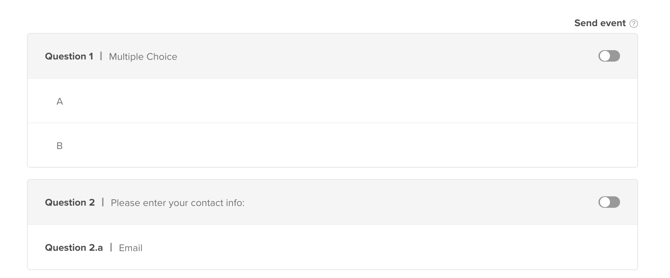
- Label the question pages or subjects and answers that you want sent to Klaviyo using the Key and Values as you want to define or map in Klaviyo.
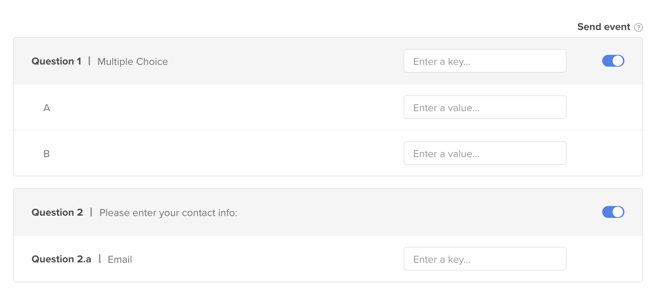
For the email field in the contact form, ensure the key is set to **email** so responses are automatically merged with the respondent’s email address.
- You may also send additional static data.
.png?width=670&height=298&name=image%20(2).png)
**Pro-tip**: Only events that are toggled on will be sent to **Klaviyo**. You will not be able to retroactively send previously collected data using this integration.
**Note**: If you add your **Klaviyo Public API Key** to a survey, you are responsible for the data collected by **Klaviyo**.
- [Getting Started](https://help.segmanta.com/getting-started?hsLang=en)
- [Survey Questions](https://help.segmanta.com/survey-questions?hsLang=en#main-content)
- [Getting Started](https://help.segmanta.com/survey-questions?hsLang=en#getting-started)
- [Display Settings](https://help.segmanta.com/survey-questions?hsLang=en#display-settings)
- [Question Customization](https://help.segmanta.com/survey-questions?hsLang=en#question-customization)
- [Advanced Settings](https://help.segmanta.com/survey-questions?hsLang=en#advanced-settings)
- [Data Enrichment](https://help.segmanta.com/survey-questions?hsLang=en#data-enrichment)
- [Survey Editor](https://help.segmanta.com/survey-editor?hsLang=en#main-content)
- [Survey Outline](https://help.segmanta.com/survey-editor?hsLang=en#survey-outline)
- [Design](https://help.segmanta.com/survey-editor?hsLang=en#design)
- [Logic](https://help.segmanta.com/survey-editor?hsLang=en#logic)
- [Configurations](https://help.segmanta.com/survey-editor?hsLang=en#configurations)
- [Permissions](https://help.segmanta.com/survey-editor?hsLang=en#permissions)
- [Distribution](https://help.segmanta.com/survey-editor?hsLang=en#distribution)
- [Integrations](https://help.segmanta.com/integrations?hsLang=en)
- [Analysis & Analytics](https://help.segmanta.com/analysis-analytics?hsLang=en#main-content)
- [Questions View](https://help.segmanta.com/analysis-analytics?hsLang=en#questions-view)
- [Results Overview](https://help.segmanta.com/analysis-analytics?hsLang=en#results-overview)
- [Organization Settings](https://help.segmanta.com/organization-settings?hsLang=en#main-content)
- [My Profile](https://help.segmanta.com/organization-settings?hsLang=en#my-profile)
- [Accounts](https://help.segmanta.com/organization-settings?hsLang=en#accounts)
- [FAQ](https://help.segmanta.com/faq?hsLang=en#main-content)
- [Survey Editor](https://help.segmanta.com/faq?hsLang=en#survey-editor)
- [Survey Analytics](https://help.segmanta.com/faq?hsLang=en#survey-analytics)
- [Organization Settings](https://help.segmanta.com/faq?hsLang=en#organization-settings)
- [Data Privacy and Security](https://help.segmanta.com/faq?hsLang=en#data-privacy-and-security)
- [Integrations](https://help.segmanta.com/faq?hsLang=en#integrations)
- [Embedding](https://help.segmanta.com/faq?hsLang=en#embedding)
- [Contact Us](https://help.segmanta.com/contact-us?hsLang=en)
- [Default HubSpot Blog](https://segmanta-2.hubspotpagebuilder.com/blog)
[](https://www.segmanta.com/)
Copyright © 2026, Segmanta