![300x300 (1).png]](https://help.segmanta.com/hs-fs/hubfs/300x300%20(1).png?height=40&name=300x300%20(1).png)
With this integration, you can send labeled question responses to Segment which can then be passed to any of the different systems that Segment integrates with.
Note: The Segment integration is limited to one integration per survey. Additionally, this integration is an Enterprise level feature.
🏠 Where it lives
- Navigate to your survey's integration home page.
- Click + Add on the Segment Customer Data integration.
🔨 How it works
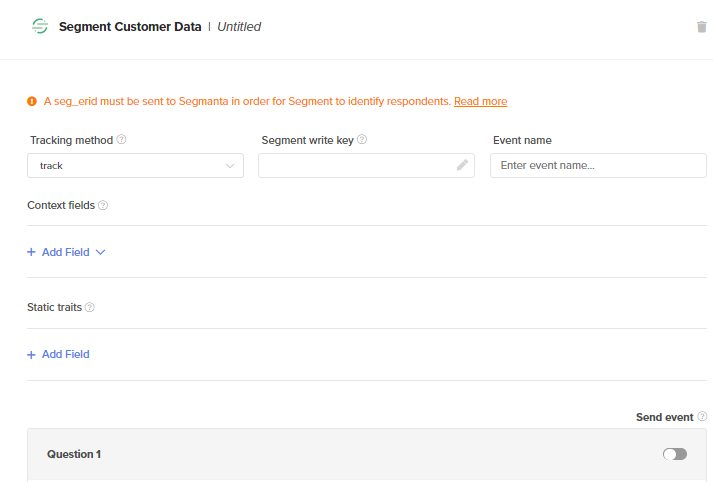
- Start by selecting your Tracking method. Segmanta integrates with two different types of communication via Segment’s API (which is the same as Segment’s write key). Those include:
- Track: It records any actions your users perform, along with any properties that describe the action. Data will be sent as an event (i.e. consumer purchased, consumer reached sign-up), with additional information sent as properties.
- Identify: It lets you tie a user to their actions and record traits about them. Data will be sent as a trait.
- Track: It records any actions your users perform, along with any properties that describe the action. Data will be sent as an event (i.e. consumer purchased, consumer reached sign-up), with additional information sent as properties.
Note: Event name will only appear for Track.
Important: Only events that are toggled on will be sent to Segment. You will not be able to retroactively send previously collected data using this integration.
- Next, add your Write Key
Important: If you add your Segment Write Key to a Survey, you are responsible for the data collected by Segment.
- Toggle on the actions you want to act as triggers to send data to Segment.
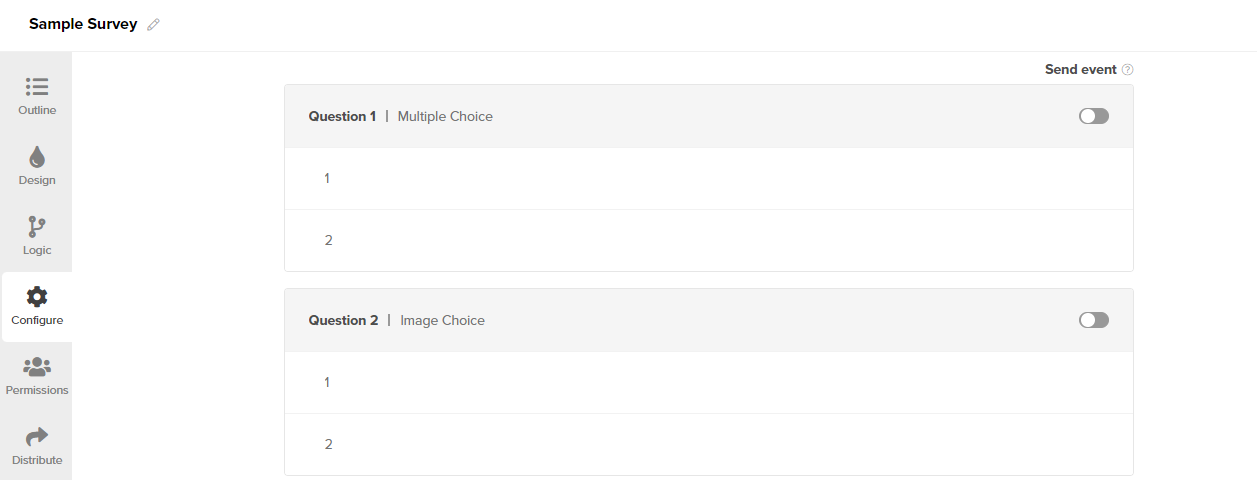
- Label the question pages or subjects and answers that you want sent to Segment using the Key and Values as defined in Segment.
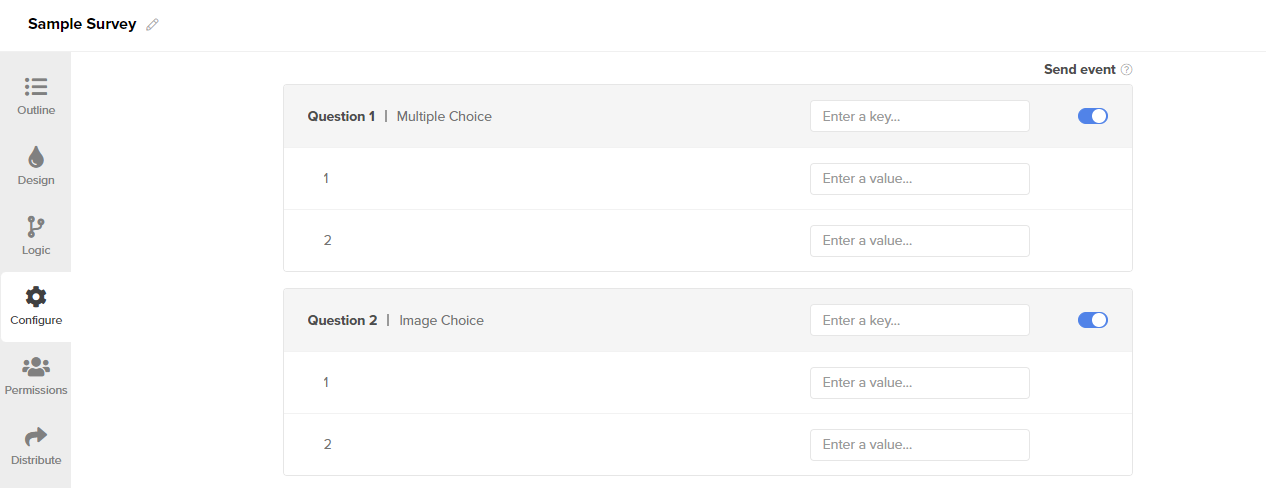
Important: Label everything that is or might be relevant for you to pass to Segment. If a question, subject or answer choice is not labeled with a key and/or value, you will not have what you need to locate the data in Segment.
- Optionally, set context fields that will be sent within the Segment context object. Context fields can be single-level or multi-level. You may also send additional static data as traits. Enter the key and value for traits.
💼 What it does
- Segment has a progressive profiling approach. This means when a consumer is identified, it is anonymous before additional identifiers are added, which eventually form a user ID.
- Therefore, if you are sending your survey to previously identified Segment users, you must provide their ID to the Segmanta survey by using a seg_erid, Segmanta’s external respondent ID.
- You could also pass an anonymous user id using the ajs_aid param (which is not recommended by Segment). If neither parameter is passed into the Segmanta survey, Segment will consider the user anonymous and assign them with a new ID.
- Segmanta provides support for passing a list of Segment Custom ExternalIds through a dedicated URL query parameter sgmnt_ceids.
Pro-tip:
For example, the following data
"sgmnt_ceids": [
    {
       "collection": "users",
       "encoding": "none",
       "id": "1234567890",
       "type": "phoneNumber"
     }
]
is to be passed as:
sgmnt_ceids[0][collection]=users&sgmnt_ceids[0][encoding]=none&sgmnt_ceids[0][id]=1234567890&sgmnt_ceids[0][type]=phoneNumber
Or for both embed types:
<script>
        window.SEGMANTA__USER_METADATA = {
            "sgmnt_ceids": [
    {
       "collection": "users",
       "encoding": "none",
       "id": "1234567890",
       "type": "phoneNumber"
     }
]
        }
</script>
Note: The externalId encoding field is always set to “none” and is not needed to be passed in the querystring. The collection field value is assumed to be ‘users’ if omitted.